
Running Facebook advertising campaigns means dealing with public feedback, from enthusiastic brand advocates to critical voices and automated spam accounts promoting knockoff designer goods. The comment section beneath your promoted content represents both opportunity and challenge.
Let's explore whether removing comments is technically feasible and strategically wise.
Jump to section
Table of Contents
The Strategic Decision Framework
The decision to disable comments isn't binary. Use this framework to determine the best strategy for your specific situation:
Should You Turn Off Comments? Decision Tree
Keep Comments ON with Smart Moderation
Best for most campaigns
- • Positive engagement + Active community
- • New product launch needing social proof
- • Established brand with AI moderation tools
- • Want to maximize conversion and lower CPC
Consider Turning OFF Temporarily
Strategic situations only
- • Crisis situation with coordinated negative attacks
- • High spam volume + Zero moderation resources
- • Highly regulated industry with compliance risks
- • Time-sensitive offer where expired info causes confusion
Don't Turn OFF for These Reasons
Common mistakes to avoid
- • Fear of occasional negative comments (handle with responses)
- • Want to "look professional" (engagement looks more professional)
- • Don't want to hire moderators (AI automation is affordable)
- • Competitor got negative comments (they need better moderation)
Pro Tip: 85% of successful ecommerce brands keep comments ON and use AI moderation. The social proof and engagement benefits typically outweigh moderation costs by 10-20x.
Turn Off vs. Moderate: Complete Comparison
Here's a side-by-side comparison to help you make an informed decision:
| Factor | Turn Off Comments | Smart Moderation |
|---|---|---|
| Social Proof | ❌ Lost completely | ✅ Preserved & enhanced |
| Algorithm Impact | ⚠️ Lower engagement signals | ✅ Higher engagement = lower CPC |
| Brand Trust | ⚠️ May seem suspicious | ✅ Transparent & responsive |
| Customer Insights | ❌ No feedback loop | ✅ Valuable product/messaging insights |
| Conversion Rate | ⚠️ 15-30% lower (no social proof) | ✅ 25-40% higher with engagement |
| Resource Needed | ✅ Zero ongoing effort | ⚠️ AI tool ($49/mo) or team time |
| Crisis Control | ✅ Complete prevention | ✅ Real-time filtering & response |
| Best For | Crisis situations, sensitive topics | Most campaigns (85%+ use case) |
💰Revenue Impact Calculator
Understanding the true cost of turning off comments:
* Turning off comments costs 40-500x more than AI moderation in lost revenue opportunity
Can You Turn Off Facebook Ad Comments?
Yes, Meta now allows advertisers to disable comments on Facebook and Instagram ads. However, this feature is currently rolling out to select business accounts with broader availability planned throughout 2026.
Why You Should Keep Comments On (Most of the Time)
Before we jump into turning off comments, let's talk about why you might want to keep them on. There are some serious benefits you'd be giving up.
Social Proof Is Marketing Gold
Positive comments on your ads are free testimonials. When potential customers see others praising your product or service, it builds trust far more effectively than any marketing copy ever could.
In fact, 70% of consumers trust recommendations from people they don't even know over branded content.
Think about it. Would you rather buy from a brand with 50 glowing comments or one with a mysteriously empty comment section? That's the bandwagon effect. People trust what others already love.
Engagement Boosts Ad Performance
Facebook's algorithm loves engagement. Comments, shares, and reactions all signal to Facebook that your ad is resonating with viewers.
This leads to:
- Lower cost per click
- Extended reach
- Higher relevance scores
You get more bang for your advertising buck when you encourage healthy engagement. And in 2026, when ad costs continue to climb, that's not something to sneeze at.
Customer Feedback Is Valuable Intelligence
Comments, even critical ones, provide real-time insights about your business. They tell you:
- What messaging actually works
- Which product features need improvement
- Customer pain points you hadn't considered
- Questions that could become FAQ content
Disabled Comments Can Look Suspicious
When people see an ad with no comment option, they sometimes wonder: "What are they hiding?" An empty comment section can raise red flags about your brand's transparency and confidence in your product.
When You Should Turn Off Comments
While keeping comments on is usually the best strategy, there are legitimate situations where disabling them makes sense:
- Sensitive or controversial topics where moderation demands would be overwhelming and constructive conversation is unlikely
- Time-sensitive promotions with limited capacity where you need to control messaging without distraction from expired offers
- Crisis management situations where your brand is actively addressing a serious issue and needs to communicate without interference
- Highly regulated industries (healthcare, finance, legal) where comment misinformation could create compliance or liability issues
The Good News: Meta Now Lets You Turn Off Comments
Meta recently rolled out a new feature that lets advertisers disable comments on Facebook and Instagram ads.
Right now, it's available to select business accounts, with plans to expand throughout 2026. This is great news for brands that want complete control over their ad messaging.
How to Turn Off Comments on Facebook Ads
Here's the step-by-step process:
Positive Comments = Better Performance
- • Lower cost per click (CPC)
- • Increased organic reach from engagement
- • Higher ad relevance scores
- • Free social proof that converts viewers
Negative Comments = Higher Costs
- • Reduced click-through rates
- • Lower engagement signals to algorithm
- • Damaged brand reputation
- • Increased customer acquisition costs
Step 1: Open Meta Ads Manager
Navigate to the 'Campaigns' tab in your Ads Manager dashboard.
Step 2: Select Your Ad
Find the ad set you want to edit and click the 'Edit' button below the ad name.
Step 3: Go to Placements
Click 'Next' to advance to the Placements section.
Step 4: Disable Comments
Under 'Inventory Filter,' select 'No one' to turn off comments completely.
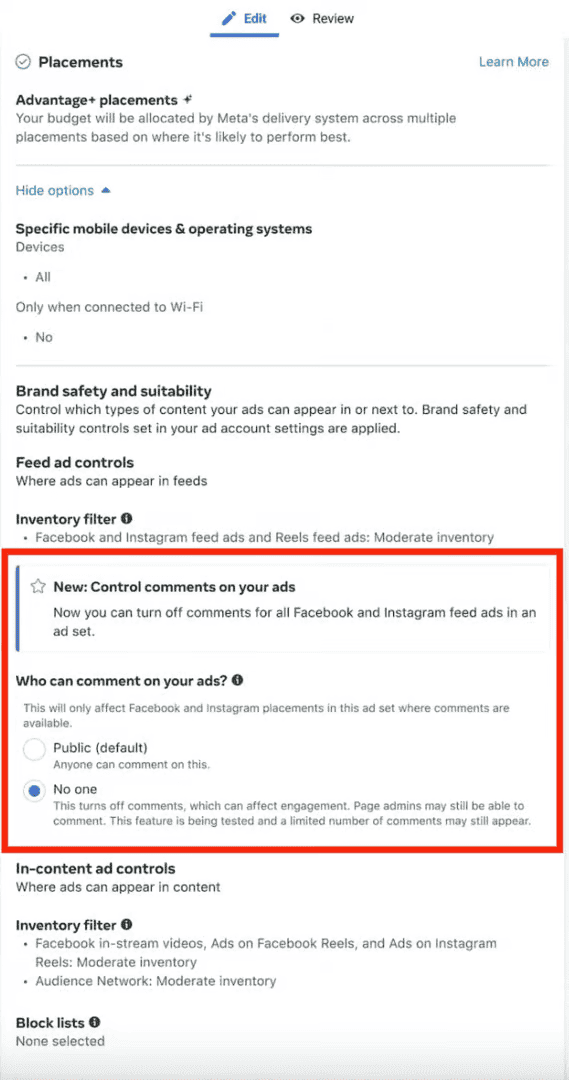
Meta Ads Manager - Control comments on your ads settings
That's it! Comments are now disabled on that ad. But before you rush to do this on all your campaigns, let's look at how real brands handle this decision...
Real-World Scenarios: 3 Case Studies
Here's how three ecommerce brands navigated the comments decision in different situations:
Scenario 1: Fashion Brand Flash Sale
Decision: KEPT COMMENTS ON
Situation
Mid-sized fashion retailer launched 48-hour flash sale on summer dresses. Ad campaign generated 3,000 comments in first 6 hours asking about sizing, colors, and shipping times.
Strategy
- Implemented SmartReply AI automation 2 hours before sale launch
- Trained AI with size guide, inventory data, and shipping policies
- Set up auto-responses for top 20 FAQs
- Enabled automatic spam filtering
- Pinned top 3 positive customer testimonials to ad
Results
Comments Managed
3,247
Response Time
< 2 min
Comment-to-Sale Rate
45%
Revenue from Comments
$127K
"Comments created a buying frenzy effect. People saw others asking questions and jumping in, which drove FOMO purchases." - Marketing Director
Scenario 2: Supplement Company During Controversy
Decision: TEMPORARILY DISABLED
Situation
Health supplement brand faced negative press from competitor-funded study questioning ingredient safety. Coordinated bot attack flooded ad comments with misinformation and fear-mongering.
Strategy
- Disabled comments on all active ads for 72 hours
- Released official statement with third-party lab certifications
- Worked with PR team to address concerns transparently
- Prepared FAQ document addressing all safety questions
- Re-enabled comments with SmartReply monitoring after crisis passed
Results
- ✅ Protected brand reputation during vulnerable 72-hour period
- ✅ Prevented spread of coordinated misinformation campaign
- ✅ Successfully re-enabled comments with 94% positive sentiment after resolution
- ✅ Implemented AI monitoring to catch future coordinated attacks early
- ⚠️ Lost approximately $18K in ad spend efficiency during disabled period
"Temporarily disabling was the right call. It gave us breathing room to respond properly instead of playing whack-a-mole with bot comments." - CEO
Scenario 3: DTC Skincare Product Launch
Decision: KEPT COMMENTS ON + MODERATION
Situation
New direct-to-consumer skincare brand launching first product with zero social proof. Needed authentic customer testimonials to build trust but worried about spam and negative comments from competitors.
Strategy
- Kept comments enabled from day one
- Used SmartReply to filter spam and competitor mentions automatically
- AI flagged positive testimonials for team to manually pin to top
- Responded personally to detailed questions to show founder involvement
- Encouraged early customers to share their experiences in comments
Results
"The authentic comments built trust faster than any paid testimonial could. People believe real customers, not polished marketing copy." - Founder
The Better Solution: Smart Comment Management
Here's the thing. Managing comments manually is exhausting. Hiring someone full-time is expensive. But ignoring them? That hurts your brand even more.
What If You Could Keep the Benefits Without the Headache?
Modern AI-powered tools can manage your Facebook ad comments automatically. Here's what they can do:
- Automatically filter spam and inappropriate content before anyone sees it
- Categorize comments by type (questions, complaints, praise, spam)
- Generate brand-appropriate responses in 30-90 seconds
- Hide problematic comments without the user knowing
- Flag urgent issues for your team to handle
Comment Management Best Practices
If you decide to keep comments on, follow these strategies:
Set Up Keyword Filters
Use Facebook's built-in filters to automatically hide comments with specific words or phrases.
Respond Quickly
Fast responses show potential customers you're engaged and care about customer service.
Hide, Don't Delete
Hidden comments disappear from public view but don't notify the user, avoiding potential escalation.
Use AI Automation
Deploy AI tools for 24/7 monitoring and instant responses to common questions.
Turn Negatives Into Positives
Addressing complaints publicly shows transparency and can actually improve your brand perception.
📊 Case Study: Boosting ROAS With SmartReply
A DTC apparel brand using SmartReply reduced comment moderation workload by 85%, removed spam 3x faster, and replied to customer questions 40% quicker. These improvements led to higher engagement rates, stronger sentiment, and a measurable lift in ROAS across their top-performing campaigns.
This is where AI-powered comment moderation tools become essential for modern ecommerce brands.
Why SmartReply Is the Best AI Comment Moderation Solution
Not all AI comment moderation tools are created equal. While you could piece together various solutions or stick with basic keyword filters, SmartReply offers a comprehensive platform specifically built for ecommerce brands running social media ads.
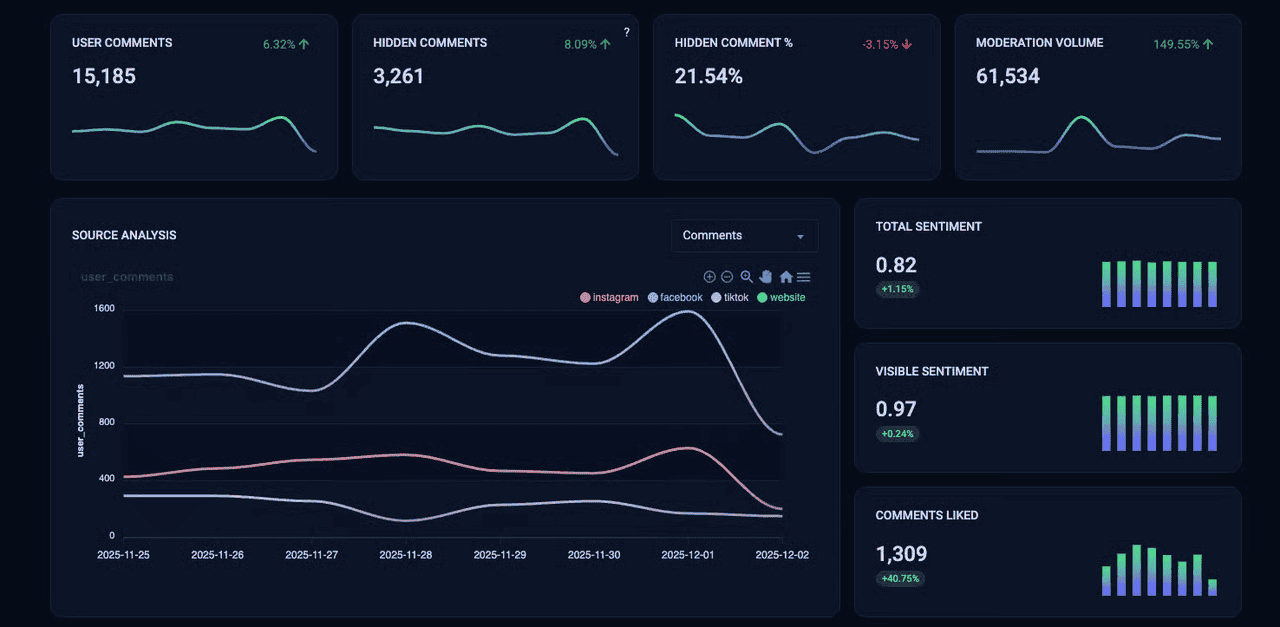
SmartReply Analytics Dashboard - Real-time comment moderation insights
Advanced AI That Actually Understands Context
Unlike basic keyword filters that miss nuanced spam or flag innocent comments, SmartReply uses advanced natural language processing to understand context, sentiment, and intent.
Our AI distinguishes between genuine customer questions and sophisticated spam bots. Something manual moderation and simple filters struggle with.
24/7 Automatic Monitoring Across All Platforms
SmartReply monitors your Facebook ads, Instagram posts, and social media channels around the clock. When someone comments at 2 AM, our AI responds in 30-90 seconds. No delays, no missed opportunities.
This means faster response times, better customer satisfaction, and improved ad engagement metrics that boost your ROI.
Brand-Consistent Responses Every Time
Train SmartReply on your brand voice, product details, and common customer questions. Our AI generates responses that sound like they came from your best customer service rep. Professional, helpful, and on-brand.
No more generic "thanks for your comment" replies that make your brand look robotic.
Powerful Analytics and Insights
Our dashboard gives you real-time visibility into:
- Comment volume and trends across all your campaigns
- Sentiment analysis showing positive vs. negative engagement
- Hidden comment metrics so you know what's being filtered
- Source tracking to see which platforms drive the most engagement
- Response time data and moderation performance
These insights help you optimize your ad creative, messaging, and targeting based on real customer feedback data.
Seamless Shopify Integration
For ecommerce brands, SmartReply goes beyond comment moderation. Our Shopify integration lets the AI answer product-specific questions, share shipping information, and even help close sales directly in the comments.
Turn your comment section into a sales channel, not just a support burden.
What Meta Doesn't Tell You About Comment Controls
- • Meta's filters are limited and often slow to remove spam
- • Comment controls do not prevent new spam across all placements
- • Manual moderation is still required on high-volume ads
Manual Moderation
- • Slow response times
- • Missed comments overnight
- • Inconsistent brand voice
- • Labor-intensive and expensive
SmartReply AI Moderation
- • Instant automated responses
- • 24/7 monitoring across platforms
- • Brand-consistent replies every time
- • Automatically removes spam across all placements
ROI That Speaks for Itself
Our customers report:
- 85% reduction in time spent on comment management
- 40% improvement in response time to customer questions
- 3x faster spam removal compared to manual moderation
- Higher ad engagement rates leading to better ROAS
- Improved brand sentiment from consistent, timely responses
Ready to See the Difference?
Join hundreds of ecommerce brands using SmartReply to transform their social media presence. Start your 14-day free trial today - no credit card required.
Try SmartReply Free for 14 DaysSetup takes less than 5 minutes • Cancel anytime • No commitment
Final Thoughts: To Turn Off or Not?
Yes, you can now turn off comments on Facebook ads. But should you?
For most businesses, the answer is no. The benefits of social proof, algorithm favorability, and customer feedback outweigh the management hassle. Especially when AI tools can handle it for you.
Smart comment management gives you the best of both worlds - engaged audiences, better ad performance, and a protected brand reputation.
Related Reading
Dive deeper into Facebook ad comment management and AI automation:
Facebook Ad Comment Moderation: The Complete 2026 Guide
Master Facebook ad comment moderation with automation strategies, compliance tips, and best practices for protecting your brand.
AI Comment Moderation for Social Commerce: Complete Framework
Learn how leading brands use AI to manage comments at scale across TikTok, Instagram, and Facebook.
AI-Powered Customer Service: The Future of Social Commerce
Explore how AI is revolutionizing customer service on social media and why ecommerce brands are making the switch.
FAQ
Does turning off comments hurt ad performance?
Turning off comments can reduce engagement signals that help lower CPC and improve reach.
Can every Facebook ad disable comments?
Not yet. Meta is rolling this feature out to select accounts throughout 2026.
Does SmartReply work with Shopify?
Yes. SmartReply integrates directly with Shopify to answer product questions inside comments.
Can SmartReply respond automatically to customer questions?
Yes. SmartReply uses context-aware AI to answer common questions in 30-90 seconds.
Does SmartReply moderate Instagram comments too?
Yes. SmartReply monitors Facebook, Instagram, and other supported channels.